

150.2KVIEWS
952REPLIES
1.5KAPPRECIATES
204ACTIVE PEOPLE
4 hours agoLAST POST
SteVTEC wroteI like this, how’s the fit? Thinking of getting one as well.Also the TrunkNets envelope style mesh cargo net advertised for the G05 X5 on Amazon came in, and is definitely a perfect fit. I wish there were real anchors on the side of the X5 to connect it to like in pretty much every other vehicle I've had, but what's there should be fine.
Nice rhodium dial YM btw

Lifeisgood20 wroteHow tough is it? Can you hit it and remove a piece by accident or is it pretty tough and can take a little abuse?Application was simple and the wrap was purchased on Amazon. Here’s a closeup pic and the paint I used to paint each end. Paint was purchased at local hardware store. I’m happy with how it matches. I’ve enjoyed this thread and getting some ideas from those who have posted-thank you everyone.
Marty in NY wroteA wrench bang may probably damage any wrap.Fantastic! I've been thinking of painting mine as they look hideous being silver in the engine bay. How tough is that wrap? If someone were to bang it with a wrench, will it tear and expose the silver? Do you think you could double wrap it? Can you post a close up of the area where the bolts are?
I would also be concerned about the wrap supporting the engine bay heat.
JoeAyalaM wroteI would imagine it would be okay, but Lifeisgood20 - please let us know how this holds up, as it's a great look!A wrench bang may probably damage any wrap.
I would also be concerned about the wrap supporting the engine bay heat.
rundeyvoo wroteLol good eye! I was wondering if anyone would notice. It's a 126622. Love it!I like this, how’s the fit? Thinking of getting one as well.
Nice rhodium dial YM btw

The net is this one:
https://www.amazon.com/dp/B08HV9C6TM?psc=1&ref=ppx_yo2ov_dt_b_product_details
Fits perfect.
SteVTEC wroteHaha, yeah I noticed it off the bat. Big watch fan hereLol good eye! I was wondering if anyone would notice. It's a 126622. Love it!
The net is this one:
https://www.amazon.com/dp/B08HV9C6TM?psc=1&ref=ppx_yo2ov_dt_b_product_details
Fits perfect.
 Hard to see if it’s the 116622 or 126622 from the pics and I couldn’t see the little Rolex crown under the 6 o’clock index. Glad you got the one with more power reserve.
Thanks for the link btw, I ordered one too!
Did not want to clutter up the cup holder area by using either the USB-A or 12V sockets up there, and the USB-C in the center console arm rest storage area would have been sketchy also. First, no cable relief cut out anywhere to sneak a cable in, and then highly prone to breaking if something gets shoved in there. Ended up snaking it all the way to the rear floor level 12V socket. Didn't have quite enough cable length to tuck the cable in neatly through the foot well and take 90 degree turns underneath the floor mats. Pretty much had to run it diagonally straight back to the rear 12V socket as soon as I got it down to floor level. Definitely don't like how it has to go diagonally across the door sill area. Included cable was 3.5m/11.48ft. Need another 2 feet or so of cable length, so will pickup a 15 ft cable from Amazon, and fix the cable routing later in the week.
Have had dash cameras in all of our cars since 2015. Started with Chinese generic unbranded A119's, then moved to branded Street Guardian A119 derivatives. Top notch dash cameras, but a bit pricey and didn't have good luck with them for whatever reason. Kept having weird failures after a year or two, so have switched over to VIOFO's now, which seem to work very well and are very reasonably priced.
I replaced them with gloss black ///M style caps from Amazon that cost 20x cheaper… a nominal price even if I have to replace them numerous times
Daedalus0101101 wroteYeah, it's completely tucked in across the headliner and everywhere else, except leading up to and around the A-pillar where it gets super impossibly tight. I should be able to get it tucked in all the way up to the A-pillar, and then at minimum just have it flush across the trim crease going around the A-pillar if I can't get it completely inside, before it tucks back in again underneath the door seals. I didn't bother to try to clean it up more because I knew I was going to need a longer cable.I've been thinking of getting a dash cam even though I have the Drive Recorder. The drive recorder doesn't give you the ability to record the crazy/funny/things leading up to/ random things that you see on a drive that you want to record. Do you have the cable tucked up under the head liner up front or just in front of it? I want to make the install as clean as possible.
Once I get the longer cable and redo the routing, the cable won't be noticed at all unless you're looking for it right around the A-pillar if I can't get it tucked in completely, or in the back where the 12V socket is and it pops up from underneath my WeatherTech mats. If I can find a cable with a right-angle USB-A on the end, that will be ideal and make the back pretty clean also.
The drive recorder is a nice thought, but the way it works and is setup, is inevitably likely to miss a lot of things when it counts. The last near miss we had, my wife had a minivan brake check her in our E93 and come almost to a dead stop, and nearly caused her to rear-end them. She honked and gunned it past them, and they flipped her off and I think screamed stop tailgating or something.
I checked the dash camera footage, and she was following at a perfectly reasonable and normal following distance for over 2 minutes prior on a local 35 mph road, and on top of that the light they were about to go through was green and not red or even yellow. Bottom line, they saw a nice car behind them and deliberately tried to cause a wreck for the insurance claim and possibly to sue, no question. They would have said the light was red and she was tailgating to try to put her at fault, both of which would have been lies and easily disproven with 2+ minutes of camera footage that the drive recorder would have missed because of only saving in a narrow 20 or 30 second window.
An astounding number of people try to instigate accidents when I'm in our BMW's, but rarely if ever happens if I'm in my old beater Toyota or my Suburban. Gotta protect yourself.
I tried it on ours over the weekend and it worked, but I haven't plugged in a thumb drive yet to pull the footage. Miles of lane closed ahead signs, and some dweeb in a RR comes barreling in and tries to cut us off at the last second.

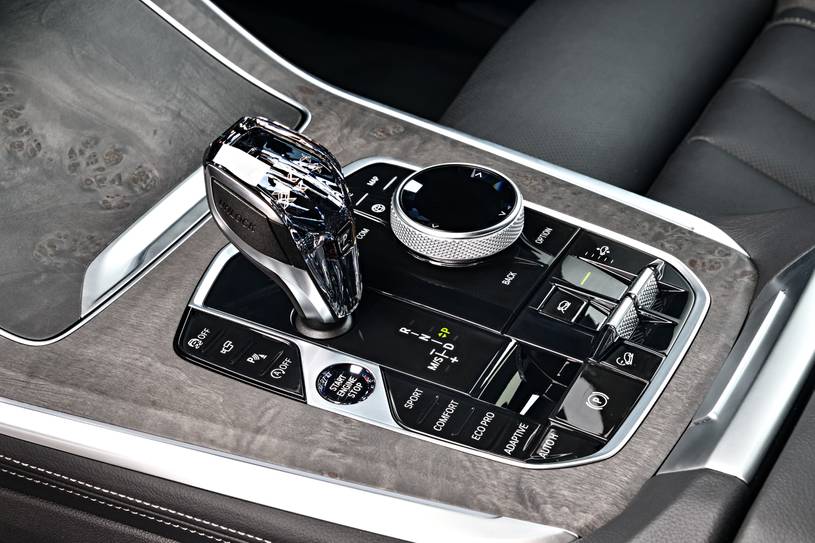
Daedalus0101101 wroteas others have done, I placed the Drive Recorder widget on the first page of my Home Screen.I just found this online. Mine looks like this minus the auto start/stop disable. Your's may be different than my car's layout. Its the button above the Parking assist features.
nZtiZia wroteDidn't even think to do that. I Have the maps, phone and media. I may move media off it and do that if the button doesn't work.as others have done, I placed the Drive Recorder widget on the first of my Home Screen.
SteVTEC wroteHonestly, I am not sure if I have or not. I changed the windows for recording, meaning I wanted the maximum recording window. First BMW and only going on week 3 of having it.You just have to run through the setup for the drive recorder once.......

nZtiZia wroteWere those the BMW $1,000 mirror cap option? If so, I’m glad I didn’t spring for those.I removed the M Performance carbon fiber side mirror caps due to delamination. they were ceramic coated and lasted shy of three years which is pretty disappointing consider their premium price. ppf would’ve saved them, but it failed after initial installation due to their curvature.
I replaced them with gloss black ///M style caps from Amazon that cost 20x cheaper… a nominal price even if I have to replace them numerous times
