

analogue wroteThank you! let me know if its not corrected for you now...The current notification mailer is not using UTF-8 text encoding after you switched the sites to use UTF-8 content at the end of February.
So right now we get mangled quotes, etc. in email text due to the classic UTF-8 vs. iso-8859-1 (er, Windows-1252) problem:
X-Mailer: PHPMailer 7.0.2 (https://github.com/PHPMailer/PHPMailer)
MIME-Version: 1.0
Content-Type: text/plain; charset=iso-8859-1
175.8KVIEWS
209REPLIES
148APPRECIATES
33ACTIVE PEOPLE
5 hours agoLAST POST

I have everything working with my code to post and reply to either the vBulletin site or the beta. But I'm noticing that the beta site will not show very large posts. Take a look at the second post in this test thread: https://g80.bimmerpost.com/beta/showthread.php?p=32677698
If you look at the same content on the current site it appears fine: https://g80.bimmerpost.com/forums/showthread.php?p=32677698
The vBulletin site limited posts to 100k characters, so that is my ceiling. For the content to appear on the beta I have to drop that down to around 26k characters of HTML before I convert it to JSON or you get nothing to display.
Let me know what you think - The post is being saved regardless of whether I send it to the beta or the current site, so I don't know if it is purely a rendering problem on the beta or if you are synchronizing two different storage formats on the back and have different limits. Most of the existing service bulletin sticky threads I maintain have a massive second post as it is a reverse chrono digest (e.g. https://g45.bimmerpost.com/beta/showthread.php?p=32306476 shows the same issue). Not sure if there are many other posts that will hit this "new" limit, but hoping those won't disappear on people.
analogue wroteNo these bug reports are incredibly helpful, keep em coming...!Hopefully the last report for a bit from me
I have everything working with my code to post and reply to either the vBulletin site or the beta. But I'm noticing that the beta site will not show very large posts. Take a look at the second post in this test thread: https://g80.bimmerpost.com/beta/showthread.php?p=32677698
If you look at the same content on the current site it appears fine: https://g80.bimmerpost.com/forums/showthread.php?p=32677698
The vBulletin site limited posts to 100k characters, so that is my ceiling. For the content to appear on the beta I have to drop that down to around 26k characters of HTML before I convert it to JSON or you get nothing to display.
Let me know what you think - The post is being saved regardless of whether I send it to the beta or the current site, so I don't know if it is purely a rendering problem on the beta or if you are synchronizing two different storage formats on the back and have different limits. Most of the existing service bulletin sticky threads I maintain have a massive second post as it is a reverse chrono digest (e.g. https://g45.bimmerpost.com/beta/showthread.php?p=32306476 shows the same issue). Not sure if there are many other posts that will hit this "new" limit, but hoping those won't disappear on people.
As for that second post, yes that is bizarre, im going to look into this more deeply and get it fixed. Luckily, the data is there, ill see why its crapping out with super long posts. I do have a text limit set for the beta site and that might be the problem. was that last super long edit submitted using the vb or beta site?
It seems the content is all there its just not outputting correctly, but I want to make sure
apptest wroteNever mind, the problem was so incredibly stupid, but it should be fixed now 👍analogue wroteNo these bug reports are incredibly helpful, keep em coming...!Hopefully the last report for a bit from me
I have everything working with my code to post and reply to either the vBulletin site or the beta. But I'm noticing that the beta site will not show very large posts. Take a look at the second post in this test thread: https://g80.bimmerpost.com/beta/showthread.php?p=32677698
If you look at the same content on the current site it appears fine: https://g80.bimmerpost.com/forums/showthread.php?p=32677698
The vBulletin site limited posts to 100k characters, so that is my ceiling. For the content to appear on the beta I have to drop that down to around 26k characters of HTML before I convert it to JSON or you get nothing to display.
Let me know what you think - The post is being saved regardless of whether I send it to the beta or the current site, so I don't know if it is purely a rendering problem on the beta or if you are synchronizing two different storage formats on the back and have different limits. Most of the existing service bulletin sticky threads I maintain have a massive second post as it is a reverse chrono digest (e.g. https://g45.bimmerpost.com/beta/showthread.php?p=32306476 shows the same issue). Not sure if there are many other posts that will hit this "new" limit, but hoping those won't disappear on people.
As for that second post, yes that is bizarre, im going to look into this more deeply and get it fixed. Luckily, the data is there, ill see why its crapping out with super long posts. I do have a text limit set for the beta site and that might be the problem. was that last super long edit submitted using the vb or beta site?
It seems the content is all there its just not outputting correctly, but I want to make sure
vreihen16 wroteNo alot more simple, I had put a limit of 20k characters, and forgot I did that so I just raised it for himCould this be happening because the server's php.ini file needs both upload_max_filesize and post_max_size raised to account for new HTTP POST encoding formats?????
- 1st pic - shows error result clicking on listed notifications
- 2nd pic - show 'blank' notifications when one actually remain
smokinjoe64 wroteAbout the first error, next time you have a notification can you copy/paste the link and either post it here or send me a PM so I can investigate further? thanks!Errors after selecting a new notification.
- 1st pic - shows error result clicking on listed notifications
- 2nd pic - show 'blank' notifications when one actually remain
apptest wroteIt looks like the email text encoding issue is half fixed. I got another message today with mojibake. The content type header is set to UTF-8 now, but the post text in the message appears to have already suffered being decoded as Windows-1252 from a UTF-8 source before being added to the message.Thank you! let me know if its not corrected for you now...
snippet of raw email with encoding problems highlighted in red:
From: BIMMERPOST <no-reply@bimmerpost.com>
Subject: New reply: US Dealer: IX is dead after MY2026
Message-ID: <8Q9MS7uwsXs6Z4DU4hoa2sg9fImqGK0w6LxFoQmbQ7k@newwe b7>
X-Mailer: PHPMailer 7.0.2 (https://github.com/PHPMailer/PHPMailer)
MIME-Version: 1.0
Content-Type: text/plain; charset=UTF-8
Content-Transfer-Encoding: 8bit
X-Authenticated-Id: no-reply@bimmerpost.com
Dear analogue,
There is a new reply to a thread you are subscribed to:
Title: US Dealer: IX is dead after MY2026
Link: https://www.bimmerpost.com/forums/showthread.php?t=2232656&goto=newpost
Here is the message posted by ubercruise
I get it, but I just feel like thereâs lots less differentiation with this. I can easily tell today at a distance based on the front end if thereâs an X3, 5, or 7 coming at me. This I feel id have a tougher time until they were close enough for me to perceive the size. To be clear I still like it. Iâm just now expecting the iX7 to be the exact same thing, just even larger. Which lowers a bit of the mystique and anticipation. But who knows.
- Most of the editor buttons (except for font and highlight color) do not have tool-tip titles on hover. Would be good to have that for usability.
- The code blocks in the editor do not work as expected. You can create one, but on save it just renders divs for bbcode_code, bbcode_code_head, bbcod_code_body without any style or PRE tags. If you edit the post again on the beta, it does not recognize the code block so you see plain text for what was originally created as a code block. Probably not a heavily used feature, but vBulletin code blocks will not translate well to the 2.0 sites.
analogue wroteIm thinking this might have to do with the current (old) app interaction with the beta site, im ASSuming that reply came from him posting from the app. That's the one part oft he site that's still only partially switched over to utf8, so until the new app is released in the App Store I can't rule that out for certain. If you are willing to hang with me on this issue until the the new app is out that would be really helpful, then again it could take some time for the app to really disseminate to all the different devicesapptest wroteIt looks like the email text encoding issue is half fixed. I got another message today with mojibake. The content type header is set to UTF-8 now, but the post text in the message appears to have already suffered being decoded as Windows-1252 from a UTF-8 source before being added to the message.Thank you! let me know if its not corrected for you now...
snippet of raw email with encoding problems highlighted in red:
From: BIMMERPOST
Subject: New reply: US Dealer: IX is dead after MY2026
Message-ID:
X-Mailer: PHPMailer 7.0.2 (https://github.com/PHPMailer/PHPMailer)
MIME-Version: 1.0
Content-Type: text/plain; charset=UTF-8
Content-Transfer-Encoding: 8bit
X-Authenticated-Id: no-reply@bimmerpost.com
Dear analogue,
There is a new reply to a thread you are subscribed to:
Title: US Dealer: IX is dead after MY2026
Link: https://www.bimmerpost.com/forums/showthread.php?t=2232656&goto=newpost
Here is the message posted by ubercruise
I get it, but I just feel like thereâs lots less differentiation with this. I can easily tell today at a distance based on the front end if thereâs an X3, 5, or 7 coming at me. This I feel id have a tougher time until they were close enough for me to perceive the size. To be clear I still like it. Iâm just now expecting the iX7 to be the exact same thing, just even larger. Which lowers a bit of the mystique and anticipation. But who knows.
analogue wroteAwesome catches, added to the todo list and should be relative easy fixes
- Most of the editor buttons (except for font and highlight color) do not have tool-tip titles on hover. Would be good to have that for usability.
- The code blocks in the editor do not work as expected. You can create one, but on save it just renders divs for bbcode_code, bbcode_code_head, bbcod_code_body without any style or PRE tags. If you edit the post again on the beta, it does not recognize the code block so you see plain text for what was originally created as a code block. Probably not a heavily used feature, but vBulletin code blocks will not translate well to the 2.0 sites.
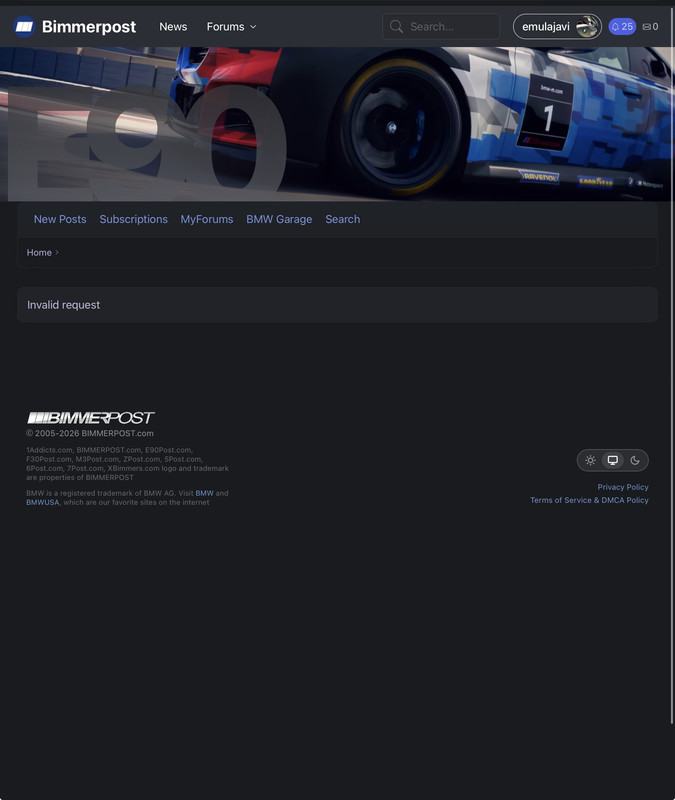
Message I always see
My notifications pane
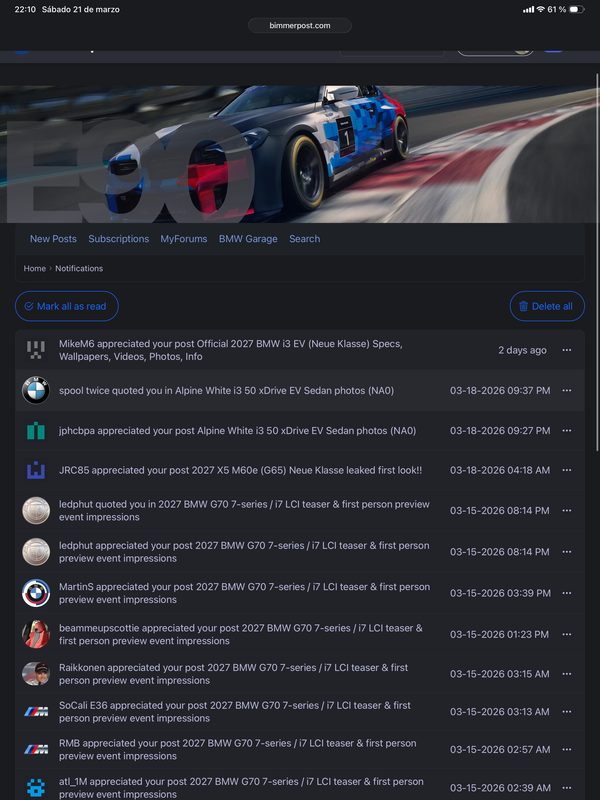
Example link of notification about the new 3 series
https://www.bimmerpost.com/beta/showthread.php?p=32681433
https://www.bimmerpost.com/beta/showthread.php?p=32682132
This one of other series works fine
https://www.bimmerpost.com/beta/showthread.php?p=32680108
So it seems to be related only to the 3 Series things
emulajavi wroteAre you saying if you click it’s from the homepage and you were already logged into the g50 site the. You get redirected to that blank page?When I try to access something related to the new 3 series from the main page I get an ‘invalid request’ message if I’m logged in. If I’m not logged in, the forum page it redirects to displays fine. Same thing happens if I try to enter into any notification that point to something 3 Series related
Message I always see
My notifications pane
Example link of notification about the new 3 series
https://www.bimmerpost.com/beta/showthread.php?p=32681433
https://www.bimmerpost.com/beta/showthread.php?p=32682132
This one of other series works fine
https://www.bimmerpost.com/beta/showthread.php?p=32680108
So it seems to be related only to the 3 Series things
apptest wroteExactly. If (while logged in as you can see on the screenshots) I click on any of the red circled, the invalid request page appears. For the 7 Series I get fine into the post.emulajavi wroteAre you saying if you click it’s from the homepage and you were already logged into the g50 site the. You get redirected to that blank page?When I try to access something related to the new 3 series from the main page I get an ‘invalid request’ message if I’m logged in. If I’m not logged in, the forum page it redirects to displays fine. Same thing happens if I try to enter into any notification that point to something 3 Series related
Message I always see
My notifications pane
Example link of notification about the new 3 series
https://www.bimmerpost.com/beta/showthread.php?p=32681433
https://www.bimmerpost.com/beta/showthread.php?p=32682132
This one of other series works fine
https://www.bimmerpost.com/beta/showthread.php?p=32680108
So it seems to be related only to the 3 Series things
If I log out and try again, everything works fine.
I’ve tried deleting cooking and bimmerpost website data with no difference.
emulajavi wroteOk I think I understand, thank you! When you highlight the link (not click it) what is the url that shows up for you as what the link is supposed to be?apptest wroteExactly. If (while logged in as you can see on the screenshots) I click on any of the red circled, the invalid request page appears. For the 7 Series I get fine into the post.Are you saying if you click it’s from the homepage and you were already logged into the g50 site the. You get redirected to that blank page?
If I log out and try again, everything works fine.
I’ve tried deleting cooking and bimmerpost website data with no difference.
what i can't seem to do however is with the same login account, get into bimmerpost.com at all.
apptest wroteThis is for example what shows for the current two top on the home page about the new M3emulajavi wroteOk I think I understand, thank you! When you highlight the link (not click it) what is the url that shows up for you as what the link is supposed to be?Exactly. If (while logged in as you can see on the screenshots) I click on any of the red circled, the invalid request page appears. For the 7 Series I get fine into the post.
If I log out and try again, everything works fine.
I’ve tried deleting cooking and bimmerpost website data with no difference.
https://g50.bimmerpost.com/forums/showthread.php?t=2234079
https://g50.bimmerpost.com/forums/showthread.php?t=2234079
both lead to the invalid request page
If I click on them while here, they also lead to the invalid request page.
The link that show for the 7 series article (the first that opens fine is)
https://www.7post.com/forums/showthread.php?t=2233538
emulajavi wroteOk im not exactly sure why it would give you that problem, so im taking a few guesses and I just made a change. Could you see if going there from the homepage still gives you the error? you should essentially see a G50 header graphic as well (instead of it saying E90)apptest wroteThis is for example what shows for the current two top on the home page about the new M3Ok I think I understand, thank you! When you highlight the link (not click it) what is the url that shows up for you as what the link is supposed to be?
https://g50.bimmerpost.com/forums/showthread.php?t=2234079
https://g50.bimmerpost.com/forums/showthread.php?t=2234079
both lead to the invalid request page
If I click on them while here, they also lead to the invalid request page.
The link that show for the 7 series article (the first that opens fine is)
https://www.7post.com/forums/showthread.php?t=2233538
apptest wroteStill showing the error but the graphic shows G50 as you saidemulajavi wroteOk im not exactly sure why it would give you that problem, so im taking a few guesses and I just made a change. Could you see if going there from the homepage still gives you the error? you should essentially see a G50 header graphic as well (instead of it saying E90)This is for example what shows for the current two top on the home page about the new M3
https://g50.bimmerpost.com/forums/showthread.php?t=2234079
https://g50.bimmerpost.com/forums/showthread.php?t=2234079
both lead to the invalid request page
If I click on them while here, they also lead to the invalid request page.
The link that show for the 7 series article (the first that opens fine is)
https://www.7post.com/forums/showthread.php?t=2233538
while being in that page that shows the invalid request message, if I click on my username, and log out, it reloads the page and the forum post is displayed correctly.
If then I click on login on the top right and log in, I’m directed back to the ‘invalid request’ message.
Finally I see a black empty space above the image, if you drag your mouse to highlight it, is there any text in there?
